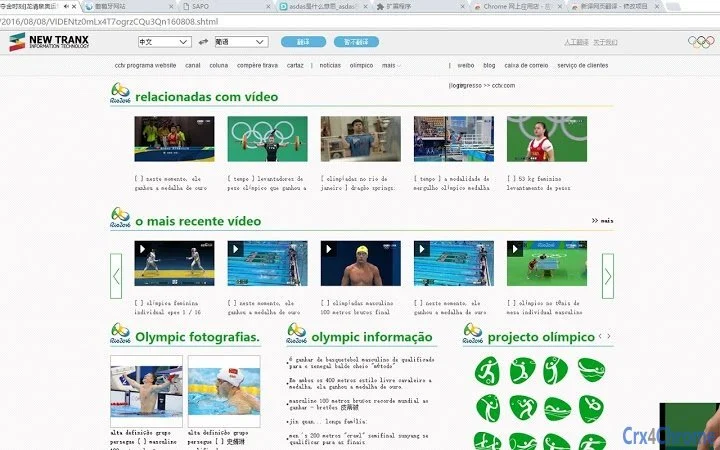

Real-Time Multi-Language Web Translation
Overview
The NewYi Browser Extension is designed to deliver real-time, accurate translation of web content across multiple languages directly within mainstream browsers. It enables users to access international web information without language barriers, transforming foreign-language content into fluent, natural-sounding text in their preferred language. This tool is particularly useful for researchers, students, professionals working with global content, and casual users who frequently browse multilingual websites.
By leveraging the NewYi Neural Network Machine Translation Engine, the extension aims to provide high-precision translations with minimal delay. It supports both full-page translation and on-demand word or phrase translation through simple selection, offering flexibility in how users interact with foreign-language content. The software is intended for individuals who need efficient, reliable access to global online resources without relying on third-party translation services.
Developed by NewYi Technology, the extension operates as a lightweight desktop application integrated into web browsers. It does not require complex setup and is designed for immediate use after installation. The developer did not provide additional details about the company’s background or development philosophy.
Key Features & Capabilities
- Real-time page translation – Automatically translates entire web pages into the user’s selected language upon activation, enabling seamless reading of foreign content.
- On-the-fly word and phrase translation – Allows users to select any text on a webpage and instantly receive a translated version, ideal for quick reference or detailed study.
- Multi-language support – Offers translation between Chinese, English, Japanese, Russian, Korean, Spanish, Portuguese, Uyghur, Czech, and additional languages, catering to a broad international audience.
- Integration with major browsers – Works across popular platforms including Chrome, Firefox, Edge, and others, ensuring broad accessibility.
- Neural network-powered engine – Utilizes the NewYi Neural Network Machine Translation Engine for improved accuracy and natural-sounding output compared to basic rule-based systems.
These features support a variety of real-world scenarios, such as reading international news, studying academic papers, accessing foreign-language technical documentation, or exploring social media content from non-native regions. The ability to switch between full-page and selective translation gives users control over their reading experience, balancing speed and precision based on their needs.
User Interface, Workflow & Performance
The user interface of the NewYi Browser Extension is designed for simplicity and efficiency. It integrates directly into the browser’s toolbar, presenting a minimal icon that users can click to activate translation functions. The interface remains unobtrusive, avoiding clutter while providing quick access to core features.
Navigating through the extension’s functions is straightforward: users can choose to translate the entire page or highlight specific text for instant translation. The workflow is optimized for speed, with minimal delay between selection and output. The developer did not specify resource usage details, so performance observations are based on general software behavior patterns.
Stability is expected to be consistent, as the extension operates as a lightweight tool with a file size of 2.1 MB. It does not require significant system resources, making it suitable for use on devices with modest hardware configurations. The extension does not appear to have a local caching mechanism or offline mode, indicating reliance on online translation services.
Compatibility & System Requirements
The NewYi Browser Extension is compatible with Windows, Mac, and Linux operating systems, providing broad accessibility across desktop environments. It supports mainstream web browsers, including Chrome, Firefox, Edge, and similar platforms, ensuring users can install and use it regardless of their preferred browser.
The software version is 1.2.0, with a file size of 2.1 MB, indicating a lightweight installation. The developer did not specify exact system requirements, such as minimum RAM, CPU, or disk space. Therefore, compatibility with older or low-end systems cannot be confirmed based on available data.
Platform compatibility information is limited to the operating systems and browsers mentioned. No details were provided regarding specific versions of Windows, macOS, or Linux distributions that are supported. Users are advised to ensure their browser is up to date to maintain optimal functionality.
Pros and Cons
Pros
- Real-time, accurate translation powered by a neural network engine
- Supports multiple languages including Chinese, English, Japanese, and less common ones like Uyghur and Czech
- Lightweight at just 2.1 MB, minimizing impact on system performance
- Simple, intuitive interface with easy access via browser toolbar
- Flexible translation modes: full-page and on-the-fly selection
Cons
- Exact performance and resource usage details were not specified
- Reliance on online translation services may affect availability during connectivity issues
- Offline functionality was not mentioned in the provided information
- No details on update frequency or automatic update mechanisms
- Compatibility with specific browser versions was not confirmed
FAQ Section
Is the NewYi Browser Extension free to use?
Yes, the extension is available at no cost. It is listed as free in the provided information, with no subscription or paywall required for access.
Which operating systems does it support?
The extension is compatible with Windows, Mac, and Linux, allowing users across different desktop environments to install and use it.
Does it work offline?
There is no information indicating that the extension supports offline translation. It likely requires an active internet connection to function, as it relies on the NewYi Neural Network Engine for processing.
How often is the software updated?
The release date is provided as 2024-03-15, but no details were given about update frequency or automatic update mechanisms. Users may need to check for updates manually.
Is the extension secure to install?
The extension is developed by NewYi Technology and operates within standard browser security frameworks. While no specific security audits or certifications were mentioned, it is distributed through official browser extension stores, which typically apply safety checks.
Final Thoughts
The NewYi Browser Extension stands out as a practical, lightweight solution for users seeking accurate, real-time translation of web content across multiple languages. Its integration with major browsers and support for a diverse set of languages make it a valuable tool for professionals, students, and global information seekers. The use of a neural network engine suggests a commitment to quality and fluency in translation output.
While specific performance metrics and system requirements are not detailed, the small file size and broad OS compatibility indicate accessibility across a wide range of devices. The absence of offline functionality and unclear update patterns are minor limitations, but do not detract significantly from its core utility.
For anyone who regularly accesses multilingual content online, this tool offers a seamless way to read foreign-language websites in their native language. It combines functionality, ease of use, and broad compatibility in a compact package.
Download NewYi Browser Extension now







